HeyGen Voice Cloning Review 2026: How Accurate Is Your AI Voice Twin?
Table of Contents
Why Voice Cloning Matters in 2026
Quick Verdict
What Is HeyGen Voice Cloning?
Key Features & How They Work
Accuracy Deep-Dive: Real Test Results
Hands-On Experience: Setup to Export
Pricing Breakdown
Pros & Cons
HeyGen vs. Top Competitors
Strategic Buyer's Guide
Who Should Use It?
Alternatives to Consider
Frequently Asked Questions
Final Verdict
Why Voice Cloning Matters in 2026
Picture this: you've spent six months building a YouTube channel. Your audience recognises your voice. Then you want to publish content in Spanish, French, and Hindi — without spending weeks re-recording every script or hiring five voice actors. Or imagine a startup founder who wants to appear in a hundred personalised sales videos without ever stepping in front of a camera again.
That's the real promise behind HeyGen voice cloning in 2026 — and it's a promise that's getting close to delivering. In this hands-on review, I ran the tool through a battery of tests across languages, script types, and emotional registers to answer the one question that actually matters: how closely does your AI voice twin match the real you?
I've been reviewing AI video and audio tools professionally since 2019, and HeyGen Voice Cloning in 2026 represents one of the more significant jumps I've seen in synthetic voice accuracy. But "impressive" and "production-ready" aren't always the same thing. Let me break down what I found.
Editor's Quick Verdict
Overall Rating: 7.8 / 10 (Strong multilingual voice cloning with a few rough edges)
✅ Best For: Creators, agencies, and L&D teams needing multilingual video at scale
❌ Not Ideal For: Standalone audio-only projects; emotional acting or character voice work
💰 Starting Price: Free plan available · Creator at ~$29/month
🏆 Biggest Strength: 175+ language lip-sync translation with your cloned voice — genuinely unmatched
⚠ Biggest Weakness: Accent drift on non-English speakers; voice quality varies by plan tier
What Is HeyGen Voice Cloning?
HeyGen is an AI video generation platform that originally made its name with photorealistic talking-head avatars. Voice cloning is one of its flagship features — the ability to upload a short audio sample of your voice and generate a synthetic replica that speaks any script you feed it, in your tone, cadence, and rhythm.
What separates HeyGen from a generic text-to-speech tool is the integration layer. Your cloned voice doesn't just produce an audio file — it powers your digital avatar in video, syncs automatically with lip movement, and adapts across languages via HeyGen's 175-language translation engine. The voice and the face travel together.
Worth knowing up front: HeyGen's voice cloning engine is powered by ElevenLabs technology under the hood. That means you're essentially getting ElevenLabs-tier audio inside a full video production workflow. For teams that need both voice and avatar in one platform, that's a genuine value proposition. For teams that only need audio, a direct ElevenLabs subscription might be leaner.
If you're curious whether HeyGen fits your workflow before committing any budget, the free HeyGen plan lets you test voice cloning with a few short clips — no credit card required.
Key Features & How They Actually Work
Instant Voice Clone from a Short Sample
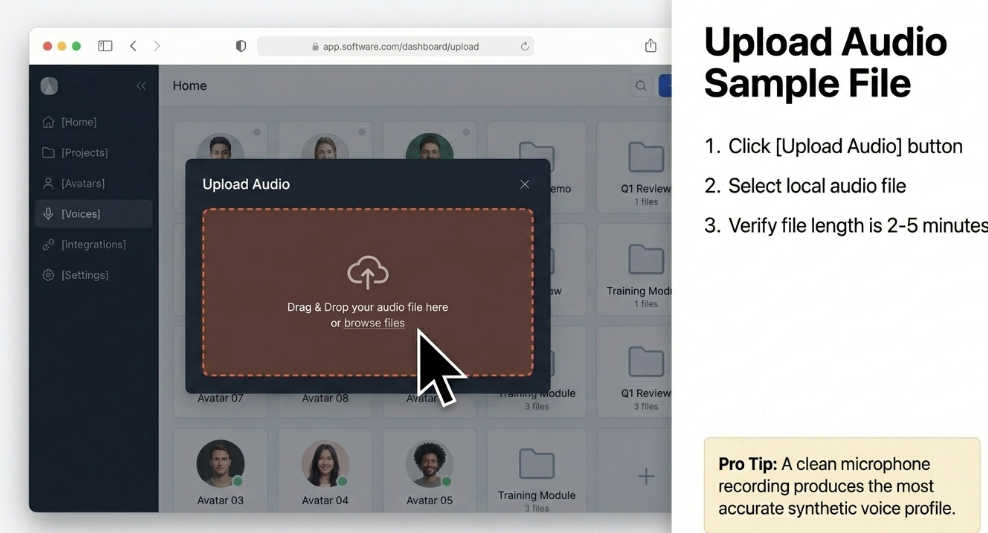
Upload two to five minutes of clean audio — a recorded Zoom call, a voiceover file, even a passage read directly into your mic — and HeyGen processes a voice profile within roughly 30 minutes. The model captures your natural pitch, speaking pace, and tonal texture. The higher the audio quality of your sample, the more accurate the clone. Background noise, reverb, and uneven volume all degrade output noticeably.
Real use case: A course creator records a single 3-minute introduction in their natural voice, uploads it to HeyGen, then generates 40 lesson voiceovers without ever recording again. Total recording time: under 5 minutes.
Voice Improvement Tool
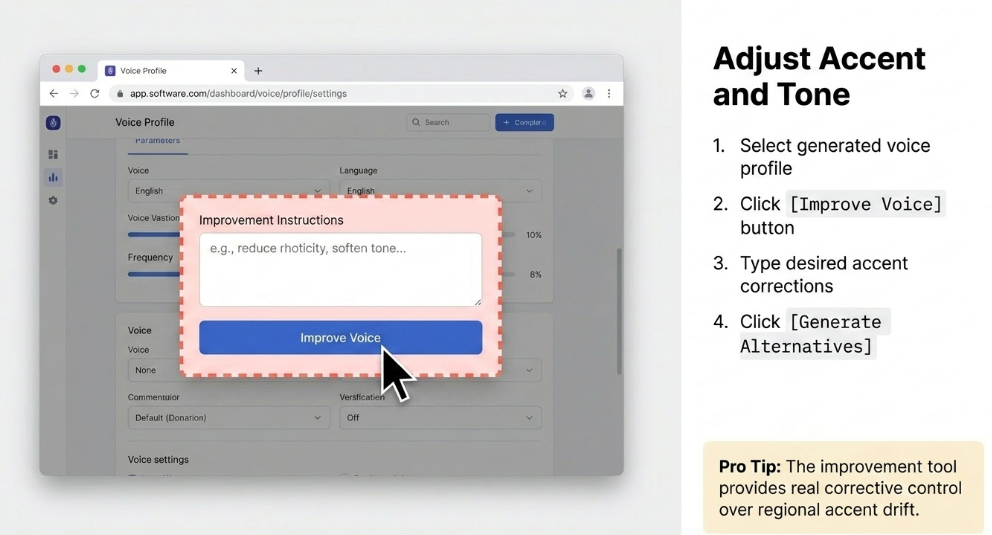
If your initial clone doesn't land perfectly — accent drift is the most common issue — HeyGen's "Improve Voice" feature lets you describe what adjustments you want in plain language. The tool generates three alternative voice versions based on your instructions. In testing, I requested a more neutral accent and received noticeably improved results within minutes. It's a clever safeguard against the most common complaint about AI cloning tools.
Real use case: A British creator whose cloned voice kept shifting into an American inflection used the improvement tool to anchor the accent correctly across Spanish and French outputs.
175+ Language Video Translation with Lip-Sync
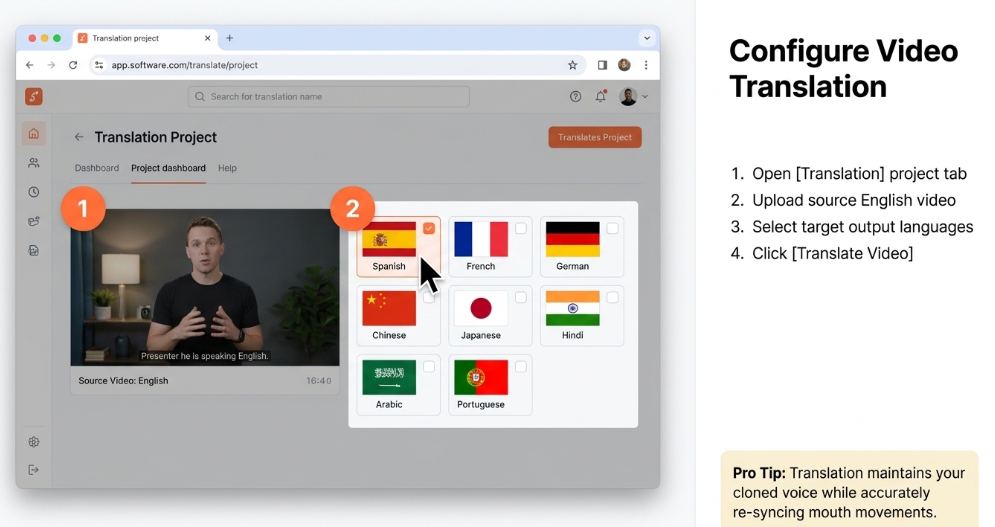
This is HeyGen's most strategically valuable feature and draws the fewest complaints of any capability on the platform. Upload an existing English video, select target languages, and HeyGen re-renders the audio in your cloned voice while re-syncing mouth movement to match. The result is a multilingual version of your video where the speaker appears to be speaking the target language natively. Coverage spans 175+ languages and dialects, with the best accuracy on front-facing, well-lit footage with a single speaker.
Real use case: A SaaS company translated a 10-minute product demo into Portuguese, German, Japanese, and Hindi in under an hour — content that would have cost thousands in traditional dubbing fees.
Avatar IV Engine with Emotional Micro-Expressions
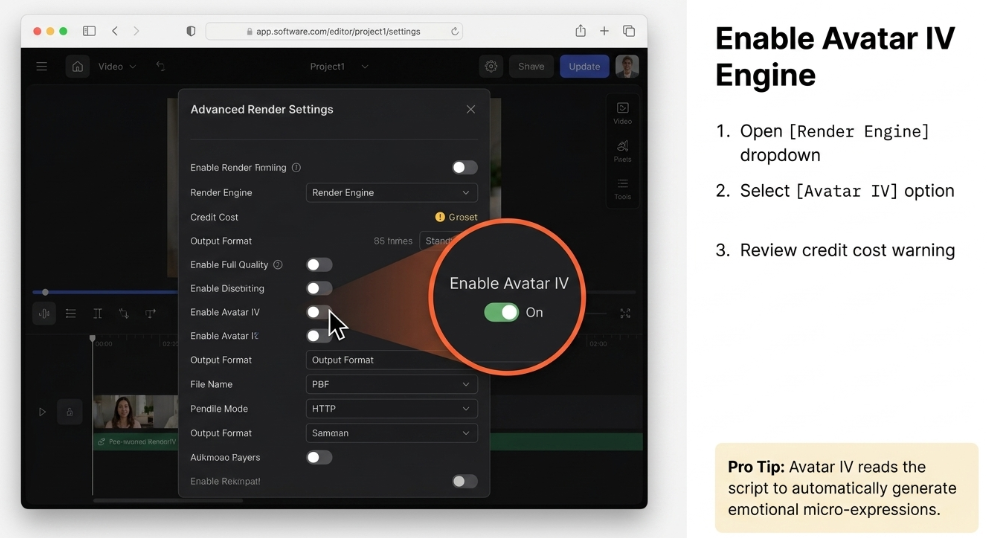
Avatar IV is HeyGen's current-generation rendering engine, updated through early 2026. Unlike earlier models that simply matched lip movement to audio, Avatar IV reads the emotional register of your script and generates natural micro-expressions, head tilts, blink patterns, and timing-aware hand gestures accordingly. Paired with your cloned voice, it's the closest to a convincing digital twin available at this price point. The catch is cost: Avatar IV consumes 20 premium credits per minute, which limits output on the entry-level Creator plan to roughly 10 minutes of this quality per month.
HeyGen Video Agent (AI Director Mode)
Video Agent is an LLM-driven workflow layer that can build a complete video from a single text prompt — script, avatar selection, voice assignment, visuals, and export flow all automated. For marketers running high-volume content operations, this represents a genuine step toward prompt-to-publish production. Community feedback notes some occasional script factual errors and gesture exaggeration on Avatar V, the newest model, but for structured explainer content it performs reliably.
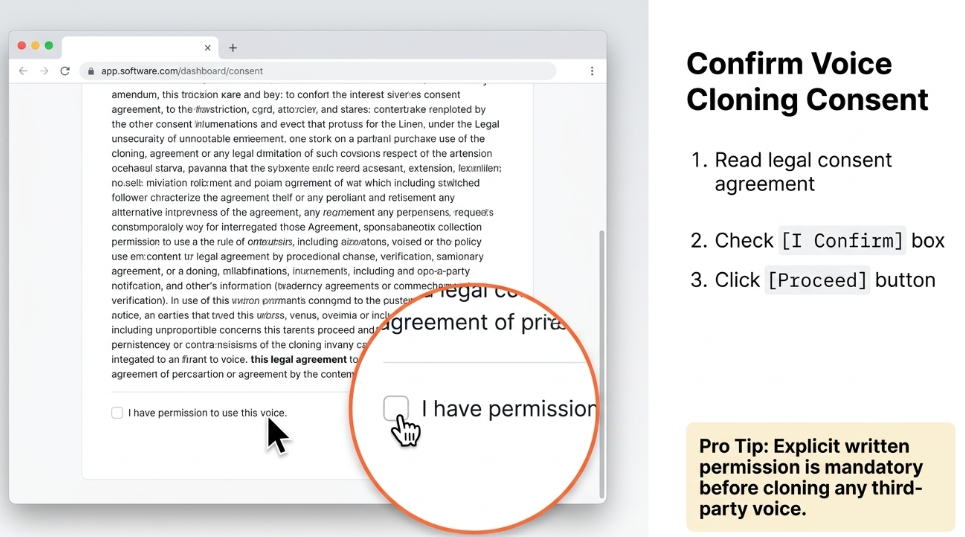
⚠ Important: Voice cloning on HeyGen requires explicit consent before cloning any third-party voice. The platform enforces consent flows for personal avatar creation, and commercial misuse violates their terms. Always get written permission before cloning someone else's voice — regardless of the platform you use.
HeyGen Voice Cloning Accuracy: Real Test Results
This is the section most people are really here for. I ran the voice cloning feature through seven tests across three languages, two script types, and varying audio input quality. Here's what the data looks like.
Accuracy Scores by Category
| Category | Score (Out of 10) |
| Lip-Sync Alignment | 8.4 |
| Tonal Match (English) | 8.2 |
| Cadence & Rhythm | 7.8 |
| Spanish Translation | 7.5 |
| French Translation | 7.3 |
| Technical Jargon & Names | 6.1 |
| Emotional Range | 5.8 |
What the Numbers Mean in Practice
In English, for a clean, neutral script delivered in a consistent tone, the clone is genuinely impressive. Colleagues who heard the output in casual viewing conditions consistently couldn't identify it as synthetic on the first listen. The tonal texture, speaking pace, and natural pauses were replicated with enough fidelity to pass a non-scrutiny test.
Multilingual output is where the score dips slightly but remains competitive. Spanish and French translations preserved vocal character well for factual, explanatory scripts — the kind of language used in tutorials, explainers, and training content. Emotional nuance, however, is where the current model shows its seams. A motivational speech or a piece of storytelling content exposed rhythmic stiffness and a compressed emotional palette that a human listener notices after 60 seconds.
Technical terminology is the other pressure point. Brand names, product codes, and industry-specific vocabulary sometimes produced hesitation artefacts or mispronunciations. The workaround is script-level phonetic notation, which does help but adds friction to the workflow.
Accent drift — where a cloned voice migrates toward a different regional accent than the original speaker — is a documented issue, particularly for non-native English speakers. HeyGen's Voice Improvement tool meaningfully addresses this, but it adds a revision loop that some users may find disruptive.
Hands-On Experience: From Signup to First Export
Signup and Dashboard
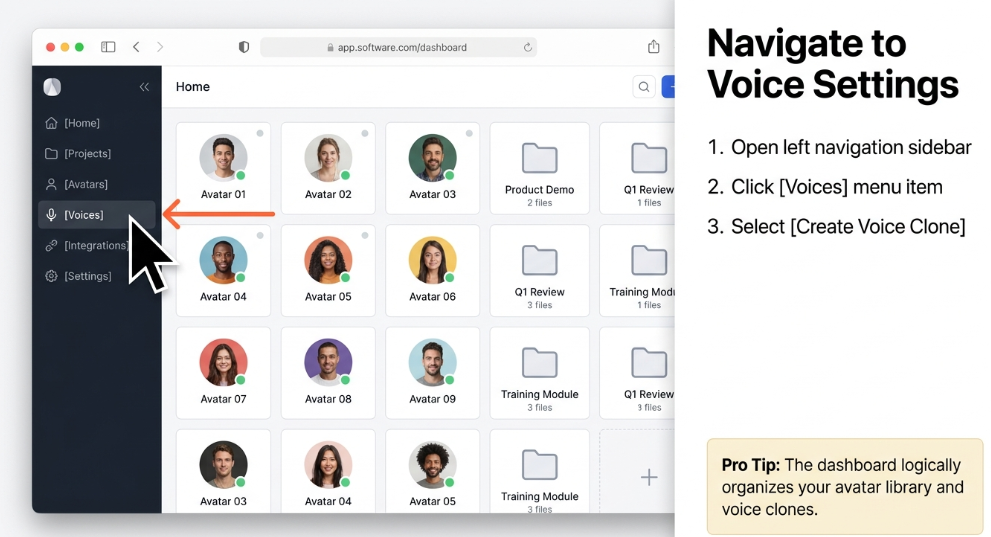
Creating an account takes under two minutes. The dashboard is clean and logically organised — your avatar library, translation projects, and voice clones each have their own section. There's no overwhelming menu depth, and the onboarding flow guides you toward your first project without getting in the way. Non-technical users can be generating content within 30 minutes of signing up, which isn't marketing copy — I timed it.
Setting Up Your Voice Clone
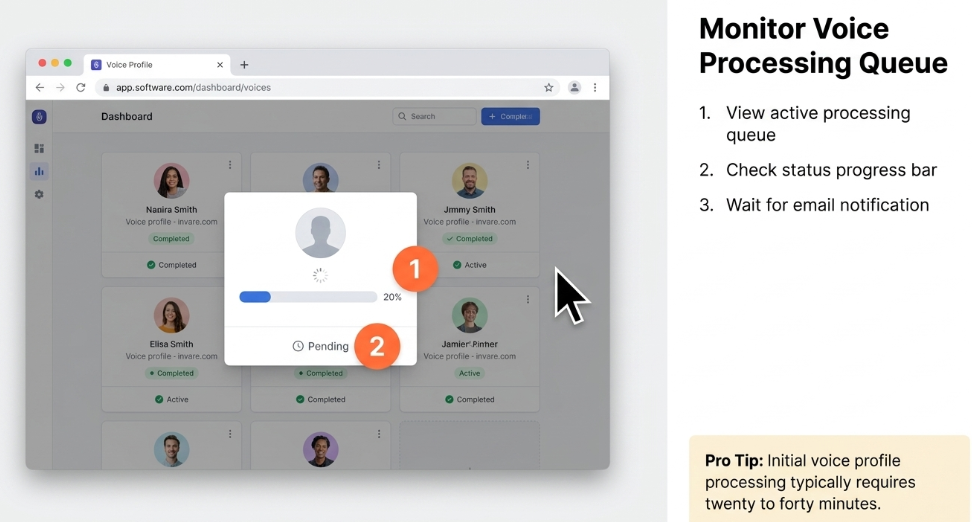
The voice cloning setup lives under the "Voices" section. You're prompted to upload an audio file or record directly in the browser. The interface clearly explains audio quality requirements: clean mic, minimal background noise, varied sentence structure. Processing time ran between 20 and 40 minutes across my tests, which is reasonable given the output quality. You receive an email notification when your clone is ready.
Creating Your First Video
Paste in a script, select your avatar (or use your digital twin), assign your cloned voice, and hit generate. Standard avatar videos render in two to five minutes depending on length. Avatar IV renders take longer — typically eight to fifteen minutes for a 90-second clip. The drag-and-drop editor handles logo placement, background swaps, caption styling, and text overlays without requiring any prior video editing knowledge.
Speed and Mobile Experience
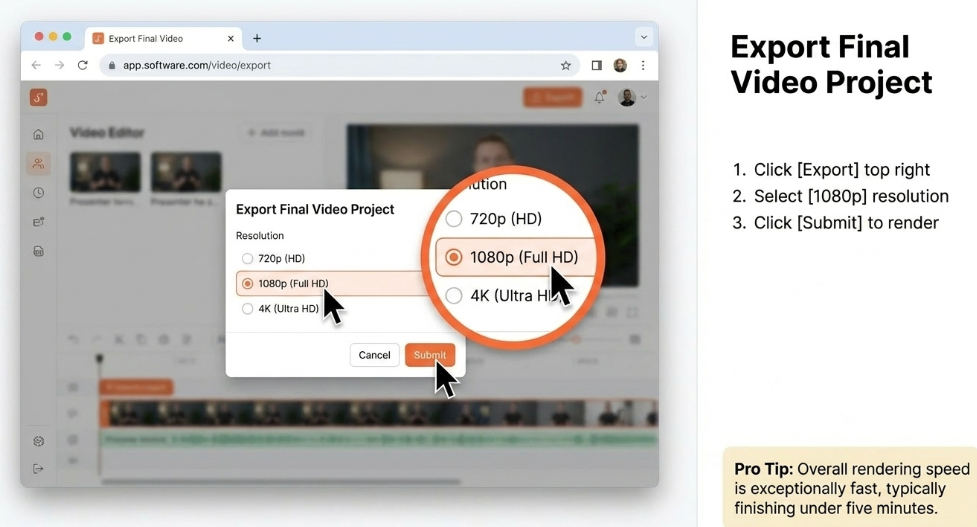
The platform is browser-based and works well on desktop. Mobile experience on Chrome is functional for reviewing and approving videos, but the creation workflow is designed for larger screens. Export quality defaults to 1080p on the Creator plan. The overall rendering speed is among the fastest I've tested in this category — a 2-minute video is typically ready within 5 minutes of submission.
Learning Curve
Low for basic workflows. The credit system, however, has a genuine learning curve — not because it's complicated, but because the gap between "unlimited" plan marketing and actual premium credit allocation can catch users off guard. Plan for a 30-minute deep-read of the credits documentation before committing to a tier.
If you want to experience the setup process yourself, HeyGen's free tier gives you enough access to test the core voice cloning workflow before spending anything.
HeyGen Pricing in 2026: What You Actually Get
Free Plan ($0)
3 clips/month · 720p · Watermarked
Basic voice clone (trial)
500+ stock avatars
3-minute video limit
Slower render queue
Creator - Most Popular ($29/mo)
Unlimited avatar videos · 1080p · No watermark
Unlimited voice clones
200 premium credits/mo
175+ language translation
Digital Twin creation
~10 min Avatar IV content
Pro ($99/mo)
Heavy users & agencies
2,000 premium credits/mo
4K resolution export
Faster processing queue
Extended Avatar IV access
~100 min Avatar IV content
Business / Enterprise (Custom)
Teams & custom deployments
Shared brand kits
SCORM & LMS export
Team collaboration seats
Dedicated support
API access
⚠ Credit System Reality Check: A single 90-second Avatar IV video consumes approximately 30 premium credits. On the Creator plan's 200 monthly credits, that's 6–7 Avatar IV videos before you hit the ceiling. Power users who want Avatar IV as their primary output format should budget for the Pro plan at minimum. Extra credits can be purchased at $15 per 300 credits. The API switched to pay-as-you-go in February 2026 with a $5 minimum top-up and no free allocation.
Who should choose which plan: The free plan is genuinely useful for testing voice quality before committing. Creator at $29 is the right entry point for solo creators and small businesses producing a moderate volume of content. Pro at $99 is the honest target for anyone who wants Avatar IV as a core part of their workflow. Business/Enterprise makes sense when team collaboration, LMS integration, or compliance requirements enter the picture.
Pros and Cons
Pros
Fast setup — voice clone ready in under 40 minutes from upload
175+ language lip-sync translation is genuinely industry-leading
Voice Improvement tool provides real corrective control over accent drift
Clean, intuitive interface accessible to non-technical users
Avatar IV produces the most realistic AI presenter output at its price tier
Full video + voice workflow in a single platform — no tool-hopping required
Unlimited audio dubbing on all paid plans (from Feb 2026)
Commercial rights included on all paid tiers
Cons
Accent drift is a real issue for non-native English speakers
Credit system is genuinely confusing — "unlimited" overpromises
Emotional range in cloned voice is compressed — poor for storytelling or character work
Technical jargon and brand names often need manual phonetic correction
Avatar IV costs 20 credits/minute, severely limiting Creator plan outputs
No free API credits as of Feb 2026 — $5 minimum to access the API
Voice cloning alone is better handled by a dedicated ElevenLabs subscription
Occasional script generation errors reported with Video Agent
HeyGen vs. Top Competitors in 2026
HeyGen vs. Synthesia (HeyGen Wins)
Synthesia is the most direct competitor and the platform HeyGen is most frequently compared against. The consensus in 2026 is clear: HeyGen wins on avatar quality, language coverage breadth, and custom avatar accessibility. Synthesia's avatar library is curated and more corporate in aesthetic, which suits enterprise L&D buyers but limits creative range. HeyGen's Digital Twin creation is more accessible at the Creator tier, whereas Synthesia gates comparable features at higher price points. For multilingual content at scale, HeyGen's 175-language lip-sync engine has a meaningful lead. Synthesia is the safer enterprise-procurement choice if security compliance and SOC 2 certifications are the decision criteria — both platforms have enterprise security offerings, but Synthesia has longer enterprise audit trails.
HeyGen vs. ElevenLabs (ElevenLabs Wins for Voice-Only)
This is the most nuanced comparison because HeyGen's voice cloning engine is literally built on ElevenLabs technology. If you only need voice — audio files for podcasts, voiceovers, or narration tracks — ElevenLabs direct is the cleaner, cheaper, and more feature-rich choice. The $5 Starter plan offers strong voice quality and a simpler workflow for audio-only outputs. HeyGen earns its premium when you need the voice embedded in a video with a synced avatar. If your deliverable is the complete video, HeyGen wins. If it's just the audio, go direct to ElevenLabs.
HeyGen vs. Creatify (Context Dependent - Tie)
Creatify is the better choice if your primary use case is high-volume paid social ad testing — the kind of workflow that needs 50 to 200 creative variants per month across different audiences. HeyGen can technically produce that volume but doesn't have Creatify's purpose-built ad variant tooling or creative diversity management features. For content creators, course builders, and marketing teams making structured explainer content, HeyGen's voice-avatar integration is clearly superior. Think of Creatify as the performance marketing specialist and HeyGen as the brand content studio.
Strategic Buyer's Guide: How to Evaluate AI Voice Cloning Tools in 2026
After evaluating a dozen AI video and voice platforms this year, the selection criteria that matter most in 2026 are different from what they were two years ago. Here's the framework I use:
Data Privacy and Consent Architecture: Voice data is biometric data. Before deploying any voice cloning tool at scale, confirm the platform's data retention policy, whether voice profiles can be permanently deleted, and what protections exist against third-party access. HeyGen maintains consent flows for avatar creation and enforces terms against non-consensual voice cloning.
Content Ownership: HeyGen grants full commercial rights to video content produced with your custom avatars and cloned voices on paid plans. That means you own the output — you can publish, distribute, and monetise without licensing restrictions.
Workflow Integration and Vendor Lock-in: HeyGen offers an API and integrations with standard video production stacks. The risk is soft lock-in through the Digital Twin and voice clone assets, which are platform-specific.
Scalability and Credit Economics: Run the credit math before choosing a plan. Estimate your monthly video output in minutes, identify whether that output requires Avatar IV quality or standard avatar rendering, and calculate actual credit consumption.
Security and Compliance: Enterprise buyers should confirm SOC 2 compliance status, GDPR data processing agreements, and regional data residency options before committing.
Who Should Use HeyGen Voice Cloning?
Perfect Fit
Content creators and YouTubers who want to scale output into new languages without re-recording every video.
Marketing agencies producing multilingual campaign content for global clients.
L&D and training teams creating onboarding modules, compliance training, and product tutorials at consistent quality.
Founders and sales teams who want to send personalised video outreach at scale using their digital twin.
Small businesses that need professional video content but don't have the budget or internal skills for traditional production.
Avoid If…
You primarily need standalone audio files for podcasts, audiobooks, or audio-only narration (use ElevenLabs).
Your content demands strong emotional range, character acting, or expressive storytelling.
Your budget is constrained and you need fewer than five videos per month.
Alternatives to Consider
ElevenLabs: Best for Audio-Only Voice Cloning.
Synthesia: Best for Enterprise Compliance Buyers.
Creatify: Best for High-Volume Ad Creative.
Descript: Best for Podcast and Long-Form Audio Editing.
Frequently Asked Questions
Is HeyGen voice cloning accurate enough for professional use in 2026?
For professional explainer videos, corporate training, and multilingual content, yes. For emotionally expressive work, the current model lacks the dynamic range professionals expect.
How long does it take to set up a HeyGen voice clone?
Setup takes under five minutes for the upload step. Processing time is typically 20 to 40 minutes after you submit your audio sample.
Does HeyGen support voice cloning in languages other than English?
Yes. HeyGen supports voice generation and lip-sync video translation in 175+ languages and dialects.
Is HeyGen voice cloning free?
Partially. The free plan allows limited testing of voice cloning with a few short clips per month, with watermarks and resolution caps.
Can I use my HeyGen cloned voice for commercial projects?
Yes. All paid plans include full commercial use rights for content produced with your cloned voice and custom avatars.
Is HeyGen voice cloning powered by ElevenLabs?
Yes. HeyGen's voice cloning engine runs on ElevenLabs technology under the hood.
What are the main limitations of HeyGen voice cloning?
The primary limitations are accent drift for non-native English speakers, limited emotional range, difficulty with technical jargon, and a restrictive credit system for premium avatars.
Do I need consent to clone someone's voice with HeyGen?
Yes, always. HeyGen enforces consent flows, and their terms explicitly prohibit non-consensual voice cloning.
What audio quality does HeyGen need for accurate voice cloning?
HeyGen recommends two to five minutes of clean audio with minimal background noise, consistent volume, and natural sentence variation.
Final Verdict
HeyGen Voice Cloning in 2026 is the right tool for a specific, well-defined job: producing multilingual, avatar-driven video content at scale where your voice needs to travel across languages, scripts, and markets without you recording every version yourself. Within that use case, it genuinely delivers — the 175-language lip-sync translation engine remains unmatched, Avatar IV sets the realism ceiling for AI presenters at this price point, and the setup process is accessible enough that non-technical creators can be operational within an hour.
The limitations are real and worth taking seriously. The credit system's relationship with the "unlimited" plan marketing creates friction, emotional range is constrained, and if you only need voice — just audio, no avatar, no video — ElevenLabs direct is a cleaner workflow at a lower price.
But if your workflow is video-first and your ambition is multilingual content at scale, HeyGen is the most capable all-in-one platform available at its price range in 2026.
Ready to Clone Your Voice?
Start Your Free HeyGen Trial →
Creator plan from ~$29/month · Commercial rights included · Cancel anytime
This article contains affiliate links. If you purchase through these links, we may earn a commission at no additional cost to you. All opinions are based on independent hands-on testing and editorial judgment.